> ## Documentation Index
> Fetch the complete documentation index at: https://docs.ionq.com/llms.txt
> Use this file to discover all available pages before exploring further.
# Compilation and native gates with Qiskit
> Learn how to use our supported QIS gateset or hardware-native gateset to run a circuit with Qiskit
This guide includes how to use IonQ's native gates in Qiskit. To learn more about what the native gates are and when to use them, refer to our guide on [getting started with native gates](/guides/getting-started-with-native-gates).
## Introduction
IonQ backends accept circuits defined in either a standard set of QIS gates (Hadamard, CNOT, Rx, etc.) or in our hardware-native gateset. This guide covers:
* How to convert from other Qiskit gates and instructions into IonQ-supported QIS gates using `qiskit.transpile()`
* How to convert from standard QIS gates into IonQ's native gateset using `qiskit.transpile()`
* How to build a circuit directly in IonQ's native gates
Building and submitting circuits using IonQ's hardware-native gateset enables you to bypass our compiler and optimizer, providing more control and transparency than the default abstract gateset (though often at the cost of performance and convenience).
Before working with native gates in Qiskit, we recommend reviewing our guides on [Getting Started with Native Gates](/guides/getting-started-with-native-gates) and [Getting Started with Qiskit](/sdks/qiskit/index). Native gates are also supported in the [IonQ API](/api-reference/v0.3/native-gates-api), [Cirq](/sdks/cirq/native-gates-cirq), and [PennyLane](/sdks/pennylane/native-gates-pennylane).
Note that the first few code examples in this section highlight specific workflow components. For end-to-end code snippets that you can copy-paste and run directly, skip to the [full code examples](/sdks/qiskit/native-gates-qiskit#full-code-examples) section below.
Native gates are an advanced-level feature. Using the hardware-native gate interface without a thorough understanding of quantum circuits is likely to result in less-optimal circuit structure and worse algorithmic performance overall than using our abstract gate interface.
***
## Transpiling to supported QIS gates
The IonQ Quantum Cloud API accepts a specific set of QIS gates, including the gates listed in [this table](api-reference/v0.3/writing-quantum-programs#supported-gates) as well as their controlled and multi-controlled variants. In many cases, gates in Qiskit's circuit library will automatically be converted to the equivalent IonQ syntax.
However, more complex abstractions and gate operations in Qiskit's library may not be directly accepted by IonQ backends. Trying to submit these would give an `IonQGateError`. In these cases, you can use Qiskit's `transpile()` function to convert to IonQ's supported QIS gateset before submission.
For example, here's a circuit using Qiskit's [UnitaryGate](https://quantum.cloud.ibm.com/docs/en/api/qiskit/qiskit.circuit.library.UnitaryGate):
```python theme={null}
from qiskit import QuantumCircuit
from qiskit.circuit.library import UnitaryGate
matrix = [[0, 0, 0, 1],
[0, 0, 1, 0],
[1, 0, 0, 0],
[0, 1, 0, 0]]
gate = UnitaryGate(matrix)
qc = QuantumCircuit(2, name="IonQ docs - transpile to supported QIS gates")
qc.append(gate, [0, 1])
qc.measure_all()
```
(Note that we've added `.measure_all()` to the UnitaryGate example in Qiskit's documentation, since IonQ backends require explicit measurement.)
If we submitted this circuit directly to an IonQ backend, we'd get an error:
```python theme={null}
IonQGateError: IonQGateError("gate 'unitary' is not supported on the 'qis' IonQ backends. Please use the qiskit.transpile method, manually rewrite to remove the gate, or change the gateset selection as appropriate")
```
Instead, we can use [Qiskit's transpilation](https://quantum.cloud.ibm.com/docs/en/api/qiskit/compiler#transpile) with an IonQ backend to automatically convert to supported gates. First, we'll set up an IonQ backend (simulator for now):
```python theme={null}
from qiskit_ionq import IonQProvider
provider = IonQProvider()
ionq_backend = provider.get_backend("simulator")
```
Then we'll transpile and submit the circuit:
```python theme={null}
from qiskit import transpile
qc_qis = transpile(circuit, backend=ionq_backend, optimization_level=0)
job = ionq_backend.run(qc_qis, shots=1000)
```
You can also draw the circuit to see which supported gates were used (Rx, Ry, Rz in this case).
The submitted circuit will pass through IonQ's compiler for additional optimization and conversion to our native gateset before it is actually run.
### Transpilation warnings
In Qiskit versions newer than 1.3.0, the default `optimization_level` used in `transpile()` is set to 2 instead of 1. With an optimization level of 2 or 3, Qiskit may perform transpiler passes that are not compatible with the further optimization performed by IonQ's compiler, resulting in a significant net reduction in efficiency and overall performance. If you're using Qiskit's transpiler to convert to supported QIS gates before submitting to IonQ backends, we recommend *always using optimization level 0 or 1*. This provides a better starting point for IonQ's compiler and our hardware-specific circuit optimizations.
Depending on your Qiskit version and its default optimization level, versions of the IonQ Provider for Qiskit (qiskit-ionq package) newer than 1.0.2 may alert you to this potential issue by showing an `IonQTranspileLevelWarning` when creating an IonQProvider or retrieving an IonQ backend. Performance will only be affected if you are using Qiskit's transpilation before submitting your circuit to IonQ, but in those cases we strongly recommend using optimization level 0 or 1 by passing `optimization_level=0` to `transpile()`. You may also change the default value in your [Qiskit user configuration file](https://quantum.cloud.ibm.com/docs/en/guides/configure-qiskit-local#user-configuration-file).
Additionally, in some versions of Qiskit (1.0.3 through 1.4.x) and the IonQ Provider, you may see warnings like `RuntimeWarning: No gate definition for [gate] can be found...`. Transpilation in these situations may be unreliable, and we recommend upgrading to Qiskit >2.0 and qiskit-ionq >1.0 if possible. Otherwise, you may transpile to a list of basis gates (you may need more or different gates than the ones listed in this example) instead of a backend, which should ultimately give similar results when submitted:
```python theme={null}
circuit2 = transpile(
circuit,
basis_gates=['rx', 'ry', 'rz', 'h', 'cx'],
optimization_level=0
)
```
***
## Transpiling a circuit to native gates
Converting a circuit to either Forte-class (ZZ two-qubit gate) or Aria-class (MS two-qubit gate) native gates with Qiskit's transpilation is supported as of v1.0.0 of the [IonQ Provider for Qiskit](https://github.com/qiskit-community/qiskit-ionq). Support for transpilation to Aria-class native gates was previously available since v0.5.1.
Start with the usual imports, plus Qiskit's `transpile()` method:
```python theme={null}
from qiskit import QuantumCircuit, transpile
from qiskit_ionq import IonQProvider
```
Build a quantum circuit using the abstract (QIS) gateset:
```python theme={null}
qc_abstract = QuantumCircuit(2, name="IonQ docs - transpile to native gates")
qc_abstract.h(0)
qc_abstract.cx(0, 1)
qc_abstract.measure_all()
qc_abstract.draw()
```
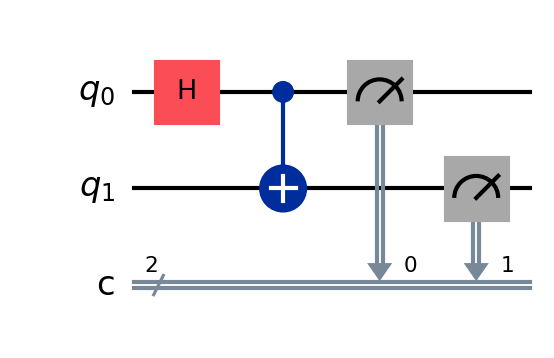 Next, set up an `IonQProvider` and backend, using `gateset="native"`. Qiskit's transpiler can use the target gateset defined by this backend.
```python theme={null}
provider = IonQProvider()
backend_native = provider.get_backend("simulator", gateset="native")
```
Finally, use Qiskit's `transpile()` method and the native-gates backend to convert the circuit to IonQ's native gateset:
```python theme={null}
qc_native = transpile(qc_abstract, backend=backend_native)
qc.draw()
```
Next, set up an `IonQProvider` and backend, using `gateset="native"`. Qiskit's transpiler can use the target gateset defined by this backend.
```python theme={null}
provider = IonQProvider()
backend_native = provider.get_backend("simulator", gateset="native")
```
Finally, use Qiskit's `transpile()` method and the native-gates backend to convert the circuit to IonQ's native gateset:
```python theme={null}
qc_native = transpile(qc_abstract, backend=backend_native)
qc.draw()
```
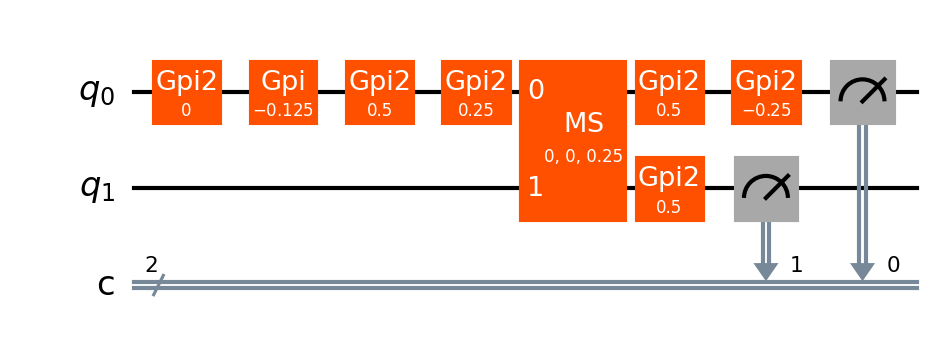 Here, we can see that the Hadamard and CNOT gates in the original circuit were converted into a series of GPI2 gates and one MS gate.
For a complete code example including circuit submission, skip to the [full code examples](/sdks/qiskit/native-gates-qiskit#full-code-examples) below.
***
## Building circuits with native gates
Native gate circuit construction is supported as of `v0.3.1` of the [Qiskit IonQ Provider](https://github.com/qiskit-community/qiskit-ionq).
Gates are provided as part of the `qiskit-ionq` package, including:
* `GPIGate(phi)`
* `GPI2Gate(phi)`
* `MSGate(phi0, phi1, theta=0.25)` for Aria systems (retired)
* `ZZGate(theta)` for Forte systems
```python theme={null}
# Import circuit and gate definitions
from qiskit import QuantumCircuit
from qiskit_ionq import GPIGate, GPI2Gate, MSGate, ZZGate
```
For more details about these gate definitions and parameters, refer to the [native gates guide](/guides/getting-started-with-native-gates#introducing-the-native-gates).
The parameters in the IonQ native gate specification are always defined in *turns*, not in radians. One turn is 2π radians.
To add these gates to a circuit, use Qiskit's `circuit.append()` method:
```python theme={null}
# Initialize the quantum circuit
circuit = QuantumCircuit(2, name="IonQ docs - build in native gates")
# Add gates (remembering that parameters are in turns, not radians)
circuit.append(MSGate(0, 0), [0, 1])
circuit.append(GPIGate(0), [0])
circuit.append(GPI2Gate(1), [1])
circuit.measure_all()
circuit.draw()
```
Here, we can see that the Hadamard and CNOT gates in the original circuit were converted into a series of GPI2 gates and one MS gate.
For a complete code example including circuit submission, skip to the [full code examples](/sdks/qiskit/native-gates-qiskit#full-code-examples) below.
***
## Building circuits with native gates
Native gate circuit construction is supported as of `v0.3.1` of the [Qiskit IonQ Provider](https://github.com/qiskit-community/qiskit-ionq).
Gates are provided as part of the `qiskit-ionq` package, including:
* `GPIGate(phi)`
* `GPI2Gate(phi)`
* `MSGate(phi0, phi1, theta=0.25)` for Aria systems (retired)
* `ZZGate(theta)` for Forte systems
```python theme={null}
# Import circuit and gate definitions
from qiskit import QuantumCircuit
from qiskit_ionq import GPIGate, GPI2Gate, MSGate, ZZGate
```
For more details about these gate definitions and parameters, refer to the [native gates guide](/guides/getting-started-with-native-gates#introducing-the-native-gates).
The parameters in the IonQ native gate specification are always defined in *turns*, not in radians. One turn is 2π radians.
To add these gates to a circuit, use Qiskit's `circuit.append()` method:
```python theme={null}
# Initialize the quantum circuit
circuit = QuantumCircuit(2, name="IonQ docs - build in native gates")
# Add gates (remembering that parameters are in turns, not radians)
circuit.append(MSGate(0, 0), [0, 1])
circuit.append(GPIGate(0), [0])
circuit.append(GPI2Gate(1), [1])
circuit.measure_all()
circuit.draw()
```
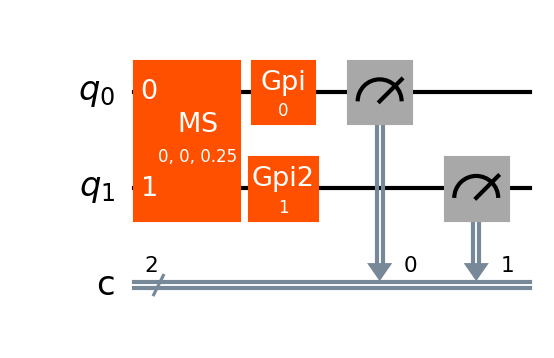 Note that Qiskit also defines MS and ZZ gates in `qiskit.circuit.library`, but these gates are *not* equivalent to the IonQ native gates. To build a circuit in IonQ native gates, make sure you're using the gates imported from `qiskit_ionq`.
For a complete code example including circuit submission, skip to the [full code examples](/sdks/qiskit/native-gates-qiskit#full-code-examples) below.
***
## Submitting a circuit that uses native gates
Whether you built a circuit in native gates originally, or you built a circuit in abstract gates and transpiled it with Qiskit, you'll need to submit it to an IonQ backend that was set up with the native gateset. Circuits submitted this way will bypass IonQ's compiler and optimizer.
Set up an IonQ backend and specify the native gateset: here, we'll use the ideal simulator, but you can also use the noisy simulator or an IonQ QPU.
This tells the backend to expect circuits defined in native gates, and to bypass IonQ's compiler and optimizer. With the default setting, `gateset="qis"`, the backend will expect circuits defined in abstract gates.
```python theme={null}
provider = IonQProvider()
backend_native = provider.get_backend("simulator", gateset="native")
```
After you define a quantum circuit `qc_native`, either by building it in native gates directly or building it in abstract gates and then transpiling it, you can submit it to the native gate backend:
```python theme={null}
job_native = backend_native.run(qc_native, shots=1000)
```
Each quantum circuit submitted to the IonQ Cloud must use a consistent gateset throughout--you cannot mix and match native gates and abstract gates in the same circuit.
For a complete code example including circuit construction, continue to the [full code examples](/sdks/qiskit/native-gates-qiskit#full-code-examples) below.
***
## Full code examples
These examples put together the pieces from the above sections to show two different complete workflows: one for building a circuit in native gates and submitting it to IonQ's simulator; one for building a different circuit in abstract gates, transpiling it via Qiskit, and submitting it to IonQ's simulator.
```python Build in native gates and run theme={null}
from qiskit import QuantumCircuit
from qiskit_ionq import IonQProvider
from qiskit_ionq import GPIGate, GPI2Gate, MSGate, ZZGate
# Set up an IonQ backend to use native gates
provider = IonQProvider()
backend_native = provider.get_backend("simulator", gateset="native")
# Initialize a quantum circuit
circuit = QuantumCircuit(2, name="IonQ docs - build in native gates")
# Add gates (remember that parameters are in turns, not radians)
circuit.append(MSGate(0, 0), [0, 1])
circuit.append(GPIGate(0), [0])
circuit.append(GPI2Gate(1), [1])
circuit.measure_all()
# Run the circuit on the native gates backend
job = backend_native.run(circuit, shots=1000)
# Print results
print(job.get_counts())
```
```python Build in QIS gates, transpile to native gates, and run theme={null}
from qiskit import QuantumCircuit, transpile
from qiskit_ionq import IonQProvider
# Set up an IonQ backend to use native gates
provider = IonQProvider()
backend_native = provider.get_backend("simulator", gateset="native")
# Build a circuit using abstract gates
qc_abstract = QuantumCircuit(2, name="IonQ docs - transpile to native gates")
qc_abstract.h(0)
qc_abstract.cx(0, 1)
qc_abstract.measure_all()
# Transpile the circuit to native gates
qc_native = transpile(qc_abstract, backend_native)
# Run the circuit on the native gates backend
job = backend_native.run(qc_native, shots=1000)
# Print results
print(job.get_counts())
```
```python Build in unsupported operations, transpile to supported QIS gates, and run theme={null}
from qiskit import QuantumCircuit, transpile
from qiskit.circuit.library import UnitaryGate
from qiskit_ionq import IonQProvider
# Set up an IonQ backend (gateset="qis" is the default)
provider = IonQProvider()
ionq_backend = provider.get_backend("simulator")
# Build a circuit using unsupported Qiskit operations
from qiskit import QuantumCircuit
matrix = [[0, 0, 0, 1],
[0, 0, 1, 0],
[1, 0, 0, 0],
[0, 1, 0, 0]]
gate = UnitaryGate(matrix)
qc = QuantumCircuit(2, name="IonQ docs - transpile to supported QIS gates")
qc.append(gate, [0, 1])
qc.measure_all()
# Transpile the circuit to supported QIS gates
qc_qis = transpile(qc, backend=ionq_backend)
# Run the circuit on the native gates backend
job = ionq_backend.run(qc_qis, shots=1000)
# Print results
print(job.get_counts())
```
***
## Additional resources
* [Getting Started with Native Gates](/guides/getting-started-with-native-gates)
* [Getting Started with Qiskit](/sdks/qiskit/index)
Note that Qiskit also defines MS and ZZ gates in `qiskit.circuit.library`, but these gates are *not* equivalent to the IonQ native gates. To build a circuit in IonQ native gates, make sure you're using the gates imported from `qiskit_ionq`.
For a complete code example including circuit submission, skip to the [full code examples](/sdks/qiskit/native-gates-qiskit#full-code-examples) below.
***
## Submitting a circuit that uses native gates
Whether you built a circuit in native gates originally, or you built a circuit in abstract gates and transpiled it with Qiskit, you'll need to submit it to an IonQ backend that was set up with the native gateset. Circuits submitted this way will bypass IonQ's compiler and optimizer.
Set up an IonQ backend and specify the native gateset: here, we'll use the ideal simulator, but you can also use the noisy simulator or an IonQ QPU.
This tells the backend to expect circuits defined in native gates, and to bypass IonQ's compiler and optimizer. With the default setting, `gateset="qis"`, the backend will expect circuits defined in abstract gates.
```python theme={null}
provider = IonQProvider()
backend_native = provider.get_backend("simulator", gateset="native")
```
After you define a quantum circuit `qc_native`, either by building it in native gates directly or building it in abstract gates and then transpiling it, you can submit it to the native gate backend:
```python theme={null}
job_native = backend_native.run(qc_native, shots=1000)
```
Each quantum circuit submitted to the IonQ Cloud must use a consistent gateset throughout--you cannot mix and match native gates and abstract gates in the same circuit.
For a complete code example including circuit construction, continue to the [full code examples](/sdks/qiskit/native-gates-qiskit#full-code-examples) below.
***
## Full code examples
These examples put together the pieces from the above sections to show two different complete workflows: one for building a circuit in native gates and submitting it to IonQ's simulator; one for building a different circuit in abstract gates, transpiling it via Qiskit, and submitting it to IonQ's simulator.
```python Build in native gates and run theme={null}
from qiskit import QuantumCircuit
from qiskit_ionq import IonQProvider
from qiskit_ionq import GPIGate, GPI2Gate, MSGate, ZZGate
# Set up an IonQ backend to use native gates
provider = IonQProvider()
backend_native = provider.get_backend("simulator", gateset="native")
# Initialize a quantum circuit
circuit = QuantumCircuit(2, name="IonQ docs - build in native gates")
# Add gates (remember that parameters are in turns, not radians)
circuit.append(MSGate(0, 0), [0, 1])
circuit.append(GPIGate(0), [0])
circuit.append(GPI2Gate(1), [1])
circuit.measure_all()
# Run the circuit on the native gates backend
job = backend_native.run(circuit, shots=1000)
# Print results
print(job.get_counts())
```
```python Build in QIS gates, transpile to native gates, and run theme={null}
from qiskit import QuantumCircuit, transpile
from qiskit_ionq import IonQProvider
# Set up an IonQ backend to use native gates
provider = IonQProvider()
backend_native = provider.get_backend("simulator", gateset="native")
# Build a circuit using abstract gates
qc_abstract = QuantumCircuit(2, name="IonQ docs - transpile to native gates")
qc_abstract.h(0)
qc_abstract.cx(0, 1)
qc_abstract.measure_all()
# Transpile the circuit to native gates
qc_native = transpile(qc_abstract, backend_native)
# Run the circuit on the native gates backend
job = backend_native.run(qc_native, shots=1000)
# Print results
print(job.get_counts())
```
```python Build in unsupported operations, transpile to supported QIS gates, and run theme={null}
from qiskit import QuantumCircuit, transpile
from qiskit.circuit.library import UnitaryGate
from qiskit_ionq import IonQProvider
# Set up an IonQ backend (gateset="qis" is the default)
provider = IonQProvider()
ionq_backend = provider.get_backend("simulator")
# Build a circuit using unsupported Qiskit operations
from qiskit import QuantumCircuit
matrix = [[0, 0, 0, 1],
[0, 0, 1, 0],
[1, 0, 0, 0],
[0, 1, 0, 0]]
gate = UnitaryGate(matrix)
qc = QuantumCircuit(2, name="IonQ docs - transpile to supported QIS gates")
qc.append(gate, [0, 1])
qc.measure_all()
# Transpile the circuit to supported QIS gates
qc_qis = transpile(qc, backend=ionq_backend)
# Run the circuit on the native gates backend
job = ionq_backend.run(qc_qis, shots=1000)
# Print results
print(job.get_counts())
```
***
## Additional resources
* [Getting Started with Native Gates](/guides/getting-started-with-native-gates)
* [Getting Started with Qiskit](/sdks/qiskit/index)